Direct Messages (private conversations) in XenForo are different than most other discussion boards and the deletion process is not obvious. In order to delete a direct message thread from your account, you must "leave" and then choose an option to accept or reject future replies. The thread will remain in the XenForo database until all participants leave it.
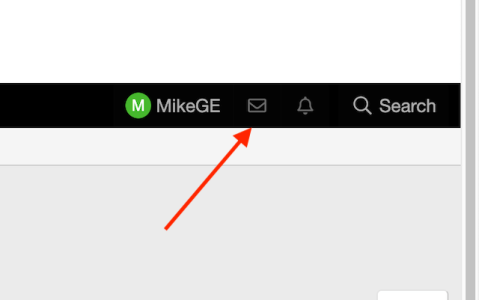
Click on the envelope icon in the menu bar next to your username.
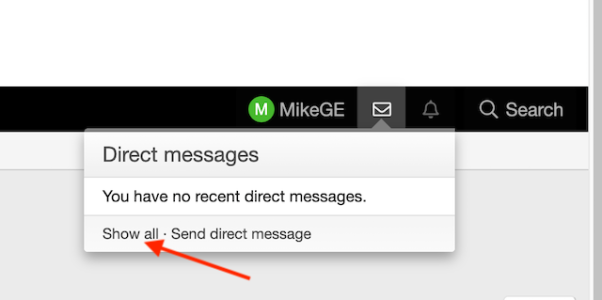
If you don't have any recent messages, click on "Show all" to view the list of stored message threads.
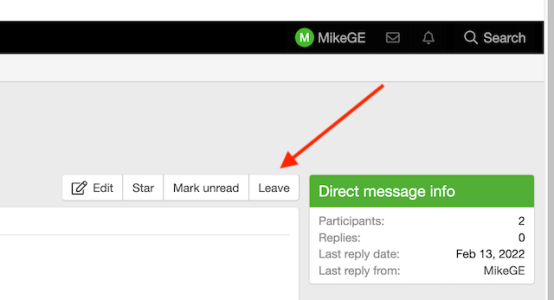
Select the message you want to delete and then click on "Leave" to start the process.
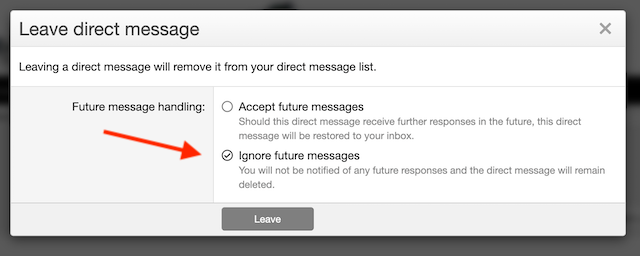
A new window will appear with two options. If you select the "Accept..." option, the message will be removed from the list until one of the other participants replies again. If you select "Ignore...", the message will be removed from the list and the other participants will not be able to include you on any future replies. Neither of these options will prevent receiving a message unless you block the sender.