Hi Paul,
Thanks for the PSA! Could I trouble you to post the replacement motor part number to save me the trouble of looking at the EKAT?
TIA, Dick
It would be better for you to type in your Tr number into EKAT since there are a number of Tr numbers for "original" CXS drills. Mine was when they were first released so the original original.
If you don't go through FestoolUsa to the EKAT site, it doesn't let you order online for *grumbles* poor cookie management.
So, visit
https://www.festoolusa.com/service/repair-service/spare-parts and click through "to the spare parts catalogue".
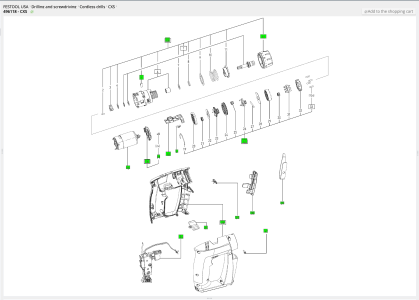
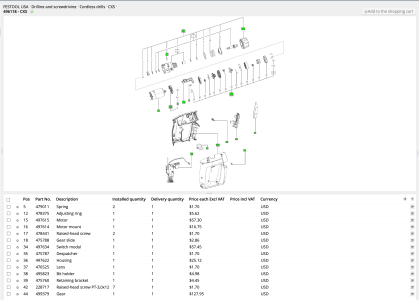
On the EKAT page, click Search in the upper right corner. Type in your CXS's T number in the first box in the left column and 'Start Search'. It will show your specific CXS. Click that model (right arrow on right; you'll have to do this twice for some reason).
My CXS is 495635. Scroll down the parts list to 'Motor' (for me, 497615 in position 15 of the drawing). That gives you the part number to order. If you select the motor, hit the cart icon at the right side of that row to add-to-cart. Now you're set to click on 'Order' in the upper right corner to have it sent your way. Or, go find your RAS to get those OEM brushes for just $12.
Now, how to put it in the CXS?
You have your motor part number. Open a new tab/window and visit ekat.festool.de (yes, you were there, but you were there FROM FestoolUSA so it lets you order, but not see key documentation because -shrugs-)
Click Search and put in the part number then 'Start Search'. Click on the motor listed that goes with your CXS (see the number in the 'Found In' column). You will be sitting on the 'motor' line in the parts breakdown. The right column 'Document links' will be blank (is for me). UNcheck the motor and magically, 3 document links will appear in the right column. It includes a link called 'wiring diagram and routing' that gives step by step for replacing the motor.
-whew- German efficiency





 ...that explains the reason I had to order the part from the UK.
