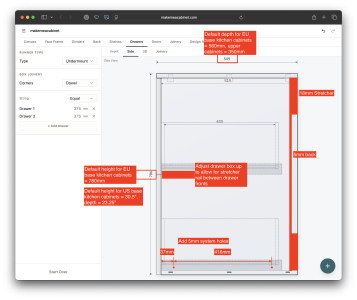
I'd like to introduce a project I've been working on for a little while, which is a new software tool designed to make designing and fabricating simple cabinets much easier for the DIYer and individual tradesman. It's still far from complete in terms of what I have in mind, but there's enough there that I think it's worth throwing it out to get some unfiltered feedback 
Over the past year since finishing the construction of my shop building and getting back into woodworking, I've found myself frequently banging my head against a wall when it came to designing simple cabinet boxes intended for assembly with Domino tenons. Working out all the dimensions and locations for domino tenons, working out drawer boxes and mounting holes, and so on is tedious and easy to goof up. Doing everything in generic CAD isn't necessarily easier, even though I'm pretty proficient in tools like Fusion and Solidworks. There's some amazing software tools out there designed for big production CNC shops, but they're not really well-suited to smaller-scale users.
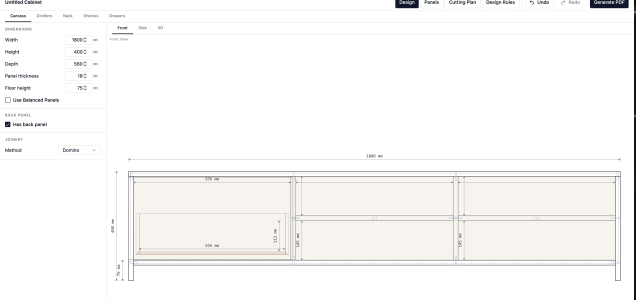
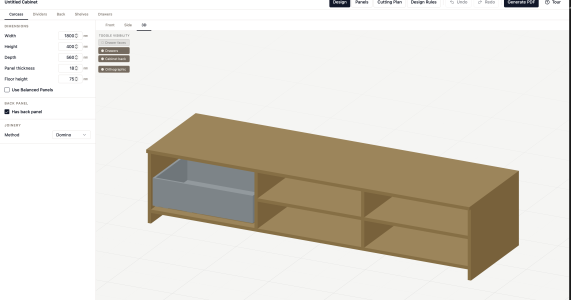
Since my professional career over the past 25+ years has been in the software industry, I decided to try building the tool I wish I had. The vision here is that in a few minutes you can put in your basic carcass dimensions, configure dividers, shelves, and drawer boxes, and get everything you need laid out with dimensioned panel and joinery details as well as a cutting plan to break down your sheets efficiently. There's no login needed, no app to download, it all runs in the browser. It can work on a smartphone, but I haven't done mobile optimization yet, so it's much easier to use on a tablet or larger screen.
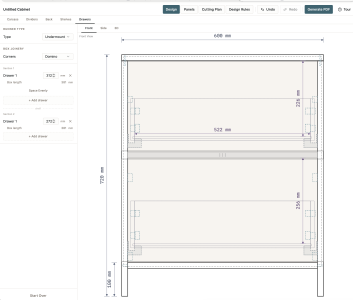
Currently, it supports generating frameless drawer fronts, and works best with undermount drawer slides. Face frame support is on the to-do list, and I plan to ship with a decent selection of drawer slide options built in so you can choose one you like. I haven't gotten to implementing doors yet, but that's getting closer to the top of the to-do list. Material choices are also limited, basically 18mm ply for the structure, 12mm for drawer boxes, 6mm for backs and drawer floors, but those will expand steadily as I progress so expect to see more choices soon.
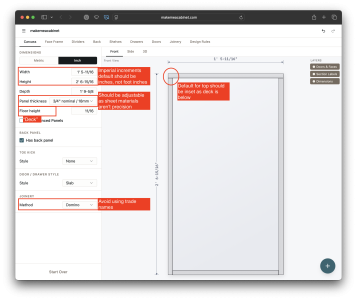
It's also only in metric right now, but will support imperial in the future.
On the flip side, and the reason why I'm sharing in this group first, is that I've built in a number of features specifically around parts of the Festool system. Domino tenon placements are calculated automatically, including the use of tight/loose mortises, and are designed to maximize use of the built-in indexing stops and 10mm offsets to make setup and layout as efficient as possible. You can also enable balanced panel sizing so that the app will help make sure 32mm hole patterns are easy to bore with the LR32 fixture system.
Anyway, that's the basic idea. There's a TON of detail and depth in the choices behind this and the ways you can use it, but I've already written a ton. In my experience, the best tools are those that just make sense, and while I have a lot more work to do, my goal is for this to be usable without requiring a manual or tutorial video.
Interested (and slightly nervous ) to see what y'all think.
Over the past year since finishing the construction of my shop building and getting back into woodworking, I've found myself frequently banging my head against a wall when it came to designing simple cabinet boxes intended for assembly with Domino tenons. Working out all the dimensions and locations for domino tenons, working out drawer boxes and mounting holes, and so on is tedious and easy to goof up. Doing everything in generic CAD isn't necessarily easier, even though I'm pretty proficient in tools like Fusion and Solidworks. There's some amazing software tools out there designed for big production CNC shops, but they're not really well-suited to smaller-scale users.
Since my professional career over the past 25+ years has been in the software industry, I decided to try building the tool I wish I had. The vision here is that in a few minutes you can put in your basic carcass dimensions, configure dividers, shelves, and drawer boxes, and get everything you need laid out with dimensioned panel and joinery details as well as a cutting plan to break down your sheets efficiently. There's no login needed, no app to download, it all runs in the browser. It can work on a smartphone, but I haven't done mobile optimization yet, so it's much easier to use on a tablet or larger screen.
Currently, it supports generating frameless drawer fronts, and works best with undermount drawer slides. Face frame support is on the to-do list, and I plan to ship with a decent selection of drawer slide options built in so you can choose one you like. I haven't gotten to implementing doors yet, but that's getting closer to the top of the to-do list. Material choices are also limited, basically 18mm ply for the structure, 12mm for drawer boxes, 6mm for backs and drawer floors, but those will expand steadily as I progress so expect to see more choices soon.
It's also only in metric right now, but will support imperial in the future.
On the flip side, and the reason why I'm sharing in this group first, is that I've built in a number of features specifically around parts of the Festool system. Domino tenon placements are calculated automatically, including the use of tight/loose mortises, and are designed to maximize use of the built-in indexing stops and 10mm offsets to make setup and layout as efficient as possible. You can also enable balanced panel sizing so that the app will help make sure 32mm hole patterns are easy to bore with the LR32 fixture system.
Anyway, that's the basic idea. There's a TON of detail and depth in the choices behind this and the ways you can use it, but I've already written a ton. In my experience, the best tools are those that just make sense, and while I have a lot more work to do, my goal is for this to be usable without requiring a manual or tutorial video.
Interested (and slightly nervous
) to see what y'all think.