
Sys-Port 500/2 (or 1000) drawer changing

bcrawley

Member
Joined
Jul 16, 2021
Messages
22
Hi, I'm trying to reorganize some drawers in an old pair of Sys-Ports. I watched on YouTube the wordless short Festool video on the 500/2; read some threads here on how drawer removal isn't as easy as that video made it look, and a mallet helps. Looked into some other old threads with all the pictures gone. I did get one drawer out. The other two drawers seem now to be locked in place. Is there a way to address this?

The lock is in the vertical position, which the guy in the Festool video turned his lock to, to begin the old video. So I think that is the unlocked position? With horizontal being locked? Not sure I can find the old key.
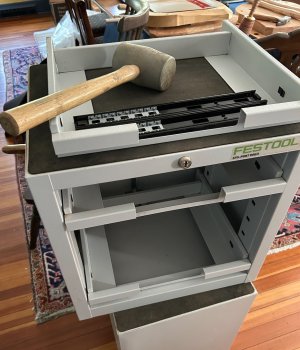
Screenshot 2026-04-27 at 3.36.39 PM.jpg
 
Usually there's a linkage bar going from the lock to down the sides with things like this that you can remove or disengage.

Have you also tried unbolting the lock from behind or simply unscrewing the linking bar there?
 
The linkage bar is in the back. If the drawers slide out at all the lock is open. I’m not sure how the thing works, somehow it is supposed to hold the drawers in the IN position while still allowing a drawer to close, which must rotate the locking bar at least briefly. But it doesn’t always work.

I have three large Sys-Ports and they can be very frustrating. One has to be frequently moved (the casters do work well) but the floor there is pitched and if I forget and turn the Sys-Port facing downhill all the drawers slide out. Nearly tipped over once.

Sometimes a drawer won’t completely close even though all the Sys-Ports are unlocked. In that case I have to pull a drawer out and remove the Systainer so I can reach the back and rotate the locking bar to the open position and then try to get all the drawers to close simultaneously. Bought them used (from “Uncle Bob”) so didn’t spend a whole lot but I wish I’d had the time to build my own.
 
Thanks all.

nclemmons the cost of a locksmith would not really be worthwhile for my purpose. I have a key that fits, but doesn't turn; but I think it may be from a Husky thing. Anyway I've confirmed my Sysport is in the "unlocked" position, as once I replace the drawer I removed, the drawers all work again. And in the videos for 500 and the 1000 both they turn the lock horizontal to lock the drawers.

luvmytools I was thinking I might just cut through the bar with a grinder. If I can remove it that might be a better idea. (Though then I'd need to find the bars if I ever resold them! And I don't imagine they are worth a lot now anyway, given the new Systainers won't all fit as neatly as the old ones, except for the first size.)

Michael Kellough that sounds frustrating... though I can only ever pull out one drawer at a time. Odd. Mine is the 500. I watched the 1000 video and yours would seem to have a green override button for the locking bar. Mine doesn't.

I can't find any written directions. I know it can be done, just not sure how. I'll mess around with it more and see if I can figure it out, or fix it. If not, I'll remove the locking bar, one way or another. I can of course build a pair of smaller Sysports; just thought I'd make use of these if I could, save myself the time of another project.
 
It should be pretty easy to remove the lock and replace it with a similar one if you wanted.

Most of these types of cabinet locks are held in from behind either by a spring clip you can just pull out, or by a nut you can remove once the linkage bar has been disconnected..

Any linkage bars are usually screwed in to the rear of the lock, usually with a phillips head screw I've always found, that you can reach from behind to undo.
 
Back
Top