
How to put an underbevel on a live edge top?

smorgasbord

Member
Joined
Jan 7, 2022
Messages
1,570
Location
NorCal
I'm almost at the point where I can't/shouldn't thin my live edge slab anymore, but still want it to look thinner. The usual/obvious technique is to put a shallow bevel on the underside. But, this slab not only as a live edge, the edge is actually curved a lot:
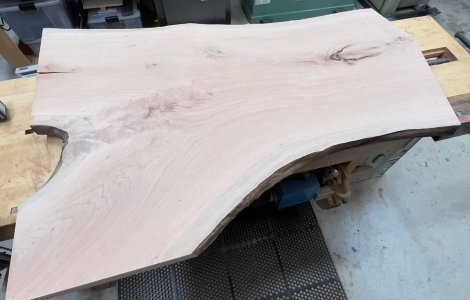
Slab.jpg

I was originally thinking this would lead me to buying an electric hand planer, but with the curve I don't think that would work after all.

One kind of crude option is to use my newly built router flattening sled to thin the slab only at the edges, say about 5" worth. I'd trace a line on the underside of the board, then cut away up to that line. I suppose I could think about softening that line by hand afterwards.

Any other ideas?
 
You could make a big template, tape or clamp it to your slab, and use a bevel router bit.

I think you would be doing the work with bottom-side-up, and would be using a bushing on your router to guide the router.
 
Freehand with a coarse grit on an orbital sander.

Any effort to make this precise, would argue against the very nature of a live edge board—that is that it is organic.

Use a rasp if you prefer, but do it without any guide for the edge. And if the angle of the underbelly relief changes as it progresses, all the more natural it will seem.

(I am going to stop now. My tablet seems to be ignoring my keystrokes—I think it has to do with the Panera WiFi.)
 
They make some pretty low angled router bits, that could do that job, up to a point. That point is only about 2" though, so it depends on how intense you want to be with this.
The rasp and RO sander is also a viable option.
 
My concern is that with the live edge, getting the top to look the same thickness will be a challenge.

I think what I'm going to try is a hybrid - take it down flat for about 4-5" from the edge, then use a "horsenose" bit to taper back to the middle thickness.
 
(I am going to stop now. My tablet seems to be ignoring my keystrokes—I think it has to do with the Panera WiFi.)

Tangent: Suggest to do the monthly “oil change” on your tablet by doing a Force Restart your iPad:

1. Quickly press and release the Volume Up button,

2. Then quickly press and release the Volume Down button,

3. Then press and hold the top (Power) button,

4. Keep holding down that Power button,

4. Wait until you see the Apple logo, then release the Power button
 
Tangent: Suggest to do the monthly “oil change” on your tablet by doing a Force Restart your iPad:

1. Quickly press and release the Volume Up button,

2. Then quickly press and release the Volume Down button,

3. Then press and hold the top (Power) button,

4. Keep holding down that Power button,

4. Wait until you see the Apple logo, then release the Power button
I’ll try that next time. Would that be a Bluetooth issue (Logitech external keyboard) or a WiFi issue? I should have tested the internal keyboard on the IPad at that time.
 
I’ll try that next time. Would that be a Bluetooth issue (Logitech external keyboard) or a WiFi issue? I should have tested the internal keyboard on the IPad at that time.

Don’t try it next time you are in the store. 🤦🏾‍♂️

Instead, do it the next time you touch your iPad. 😀

That’s the reason for the hint of ‘a monthly oil change’.

A reboot is good for all software, as you already know.

That specific procedure cleans out all the crud data lingering around on your iPad (and iPhone).

That garbage occasionally gets in the way and trips up the system software and also the apps.
 
Back
Top