Utilizing Dash-Board Track Stars?

onocoffee

Member
Joined
Sep 23, 2024
Messages
1,349
Location
Baltimore, Maryland, USA
After a friend gave me a set of Dash-Board Track Stars and the FS Surface Mount Fence, I've been watching a few of their videos to see how it all works. But what I haven't found is how to use the fence with the rail to make angled cuts. And I've noticed that the majority of videos on YouTube about the Dash-board products are videos produced by Dash-Board themselves. It makes me wonder if anyone is really using their system?

On my own MFT-modified workbench, I've bored a grid of 20mm dog holes and have the Festool MFT Swivel Unit for the rail. I'm in the midst of upgrading the workbench to fit the Festool MFT side rails to mount accessories on the side of the bench. When it's all complete, I'm trying to understand how to adjust the fence to make angled cuts, as you would if you were using the Festool CMS Miter Gauge. Any thoughts? Thanks!
 
Since I didn't really have the need frequently enough to dedicate something to it, as a table solution, I never bothered.
The few times it came up I did it with either the Woodpeckers adjustable track square or the TSO MTR square.
The disadvantage of the WP square is that it only goes one direction. This works great, most of the time, but if you cannot reference the opposite edge or turn the part over, you're stuck. I got on with it fine, for a couple of years, until that one time.
The TSO (triangle) will work either way and on an MFT grid.
I've never had any of the actual MFT stuff, since my table is shop made. I don't have the extrusions.
 
How are you adjusting the F1 Fence to match any particular angle?
The fence is perpendicular to the track. So I slide the workpiece against the fence then I move it to the right so it goes under the track and then I set it to the proper size, say for example 200mm. Then I set my saw to a 45 degree angle and make the cut.

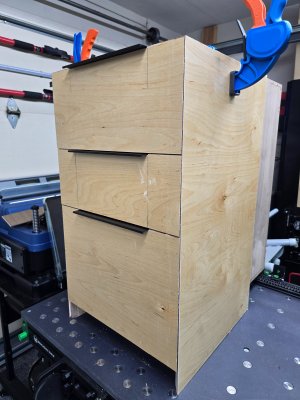
Take a look at the attached photo, I cut the side panels and drawer fronts using my Dashboard table/fence. Perfect miter edges.
 

Attachments

  • 20260104_074417.jpg
    20260104_074417.jpg
    1.7 MB · Views: 20
The fence is perpendicular to the track. So I slide the workpiece against the fence then I move it to the right so it goes under the track and then I set it to the proper size, say for example 200mm. Then I set my saw to a 45 degree angle and make the cut.

Take a look at the attached photo, I cut the side panels and drawer fronts using my Dashboard table/fence. Perfect miter edges.
That's impressive.(y)
 
  • Like
Reactions: BWS
Ironically your photo shows the drawer cabinet on an MFT table from Benchdogs UK‼️

You are fully embracing diversity of suppliers 😎
Yeah I have 2 tables, my Dashboard is used for all my rip cuts and wide cross cuts and my Benchdog Tools table is used for cross cuts only. Both have their advantages in my shop.
 
Back
Top