
CSC SYS 50 Reference Drive Fails

4thisguy

Member
Joined
Dec 19, 2010
Messages
18
I was using the saw for a few cuts, then went to make an angle adjustment when it stopped and gave me a reference drive message. So I tried to run the routine and it keeps failing before it completes - message “Reference drive cancelled”. I’m now in a loop where I can’t do anything else with the saw besides the reference drive and it keeps failing. I’ve open all the access areas I can and vacuumed. No obvious obstructions. Any ideas on troubleshooting???

The one time I have an hour to get something done and tool fails on me!
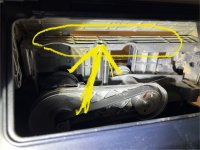
 
This just happened to me this week.  I too was stuck in an endless loop even after vacuuming, using compressed air, and removing the bottom for complete cleaning.  If you take off the side cover under the folding table side of the saw you will gain access to another hidden section above the motor.  Try and stop the reference process with the blade fully retracted and beveled.  You will then see a small silver section which would normally be facing the underside of the table. This area has a shallow pocket which can trap dust.  When it’s packed full the blade cannot raise fully which cancels the sequencing.  Once it’s cleared the saw will calibrate properly and become available for use again. 

Good luck!
 
Thanks James, I think you’re talking about up here in the picture:

Unfortunately I didn’t have a build up there, tho I did clean it out to make sure. Still failing.
 

Attachments

  • IMG_2869.jpeg
    IMG_2869.jpeg
    629.4 KB · Views: 1,807
I had this problem with mine about a week ago and managed to get it resolved by thoroughly cleaning every last bit of sawdust from under the table. I opened both sides and blew everything out with an air compressor nozzle. I removed the batteries, waited a few minutes, and reinstalled them ... twice. I even got a big red "Fatal Electronics Error" once. Eventually, though, after every little bit was cleaned and I'd cycled power a couple of times, it started working again, and I haven't had any more trouble with it since.
 
Its now feb25. I have just gone through this. My advice , in order to save time, is go straight to opening the bottom up by removing the 10 torx screws and start cleaning. If you have got to the point where you are searching for answers, it will likely be something that involves removing the bottom panel. I found a huge amount of dust and chips and fine slithers of ply .
Dont bother standing it on its end because it is a bit unstable and also you cant get to see every spot. I flipped it right over on its top and cleaned everywhere. The use of a blower and vac will help.
In my case I found a small slither of Ply had got in around the blade mechanism and was stopping the calibration. I didnt find it at first because it only got dislodged when i moved the blade on a second recalibration attempt.
I am sure for most people, this is just a matter of finding the offending piece and removing it. Using a blower will help and as I said a little patience with moving the blade in and out a few times with a calibration attempt.
Hope this helps
 
razorack said:
Its now feb25. I have just gone through this. My advice , in order to save time, is go straight to opening the bottom up by removing the 10 torx screws and start cleaning. If you have got to the point where you are searching for answers, it will likely be something that involves removing the bottom panel. I found a huge amount of dust and chips and fine slithers of ply .
Dont bother standing it on its end because it is a bit unstable and also you cant get to see every spot. I flipped it right over on its top and cleaned everywhere. The use of a blower and vac will help.
In my case I found a small slither of Ply had got in around the blade mechanism and was stopping the calibration. I didnt find it at first because it only got dislodged when i moved the blade on a second recalibration attempt.
I am sure for most people, this is just a matter of finding the offending piece and removing it. Using a blower will help and as I said a little patience with moving the blade in and out a few times with a calibration attempt.
Hope this helps
Thanks very much for this!! And for the forum.
 
Thanks so much for this. I was horrified today when my CSC 50 gave me the reference drive failure message followed by an endless loop as described above. I took the advice of this forum and removed the bottom. Then between using my fingers, a shop vac, and a mini leaf blower I was able to remove all of the built-up dust and debris. Flipped it back over, turning it on and all was well. Then I screwed the bottom back on and I was up and running. This thing collects dust and debris like crazy. Now I know how to do a thorough clean out and prevent this from happening in the future. Thanks again.
 
Thanks so much for this. I was horrified today when my CSC 50 gave me the reference drive failure message followed by an endless loop as described above. I took the advice of this forum and removed the bottom. Then between using my fingers, a shop vac, and a mini leaf blower I was able to remove all of the built-up dust and debris. Flipped it back over, turning it on and all was well. Then I screwed the bottom back on and I was up and running. This thing collects dust and debris like crazy. Now I know how to do a thorough clean out and prevent this from happening in the future. Thanks again.
I don't understand why the inside of the base has all the raised ribs in the SYS 50, they just make it so hard to keep it clean. Soon as mine's out of warranty I'll be machining up some PVC sheet to fit to the inside and help direct the dust better.
 
Mine is stuck in the endless loop. Mine gets very little use. I took the bottom off and cleaned all the dust out. There wasn't a lot. Still stuck in the loop. I cannot figure it out. I put a service request in. My saw is about a year old and should be under warranty. But it is extremely frustraighting to spend so much money and not be able to cut a piece of wood. How does anyone make a living with this tool?
 
Hi Jimbo

Did you manage to sort this out with Festool?

Mines just done it because I think I tried changing the blade out from a 160mm without remembering I had to set it to a much higher base level. Can't get it to reset at all after following all the above advise.

UPDATE :- All now works ok after blowing it out, switching cycling the power several times.
Never saw anything that could have caused the problem apart from a vast amount of dust.

Happy Bunny again.
 
Last edited:
Hi
Bought my saw the day after thy came out, and have used it for 2 years and love it. I am a little intimidated with the electronics but enjoy the benefits they offer. I too have a problem with shavings getting pulled into the bottom blade guard and clogging up the dust chute and then clogging up the saw. I figured it out pretty quick the first time when I was getting a sawdust shower from the blade. After cleaning, blowing out, and vacuuming, I could use the saw without a dust shower. Now when it happens I do a quick check of the bottom blade guard and sure enough it has a sliver of wood clogging up the dust chute. So here is some advice, always check and clean out bottom blade guard by accessing the panel under the slider with the Allen key, and twist open latch on bottom blade guard and clean out debris. I decided to travel with my saw standing upright in my work van and hoped the saw would shake itself clean. Wow was I right, after two weeks of Boston roads bouncing and shaking, lots more dust emptied out when I opened it for use on the next job. So keep an eye on the dust, keep the saw clean, and pack it upright for travel to shake out the hidden dust.
 
Back
Top